1.Connecting iPhone hardware to computer

Lightning cable connects to the phone, and a USB-C cable connects the hardware to the computer.
Please use the included black Lightning cable or USB-C cable; other cables will not be supported.
iClick jailbreak-free PC Control iPhone iOS Automation Script OTG Batch synchronization control phone farm iPhone automate tasks ๐Ÿ‘‰Click to buy

2.iPhone Settings

1.Enable Assistivetouch

Settings-Accessibility-Touch-Assistivetouch(ON)-(AlwaysShowMenu-close Tracking Sensitivity -Max) iClick jailbreak-free PC Control iPhone iOS Automation Script OTG Batch synchronization control phone farm iPhone automate tasks

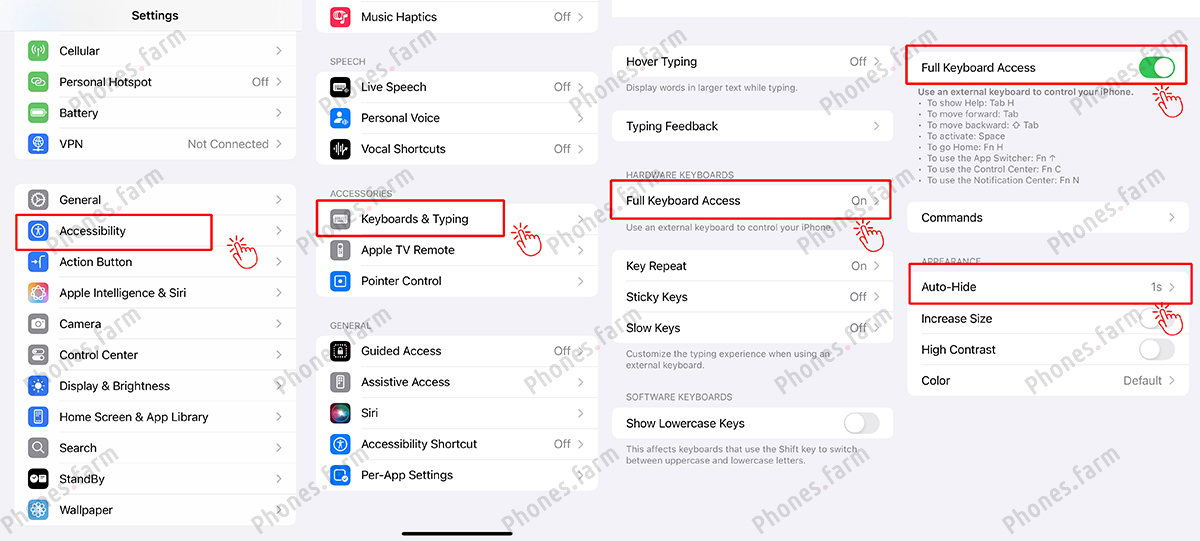
2.Enable Keyboards

Settings-Accessibility-Keyboards-Full Keyboard Access(On)-Auto Hide(1s) iClick jailbreak-free PC Control iPhone iOS Automation Script OTG Batch synchronization control phone farm iPhone automate tasks
3.Enable Trackpad&Mouse

Settings-General-Trackpad&Mouse-Tracking SPeed -Minimum
This option will only appear if the phone-hardware-and computer are connected.
iClick jailbreak-free PC Control iPhone iOS Automation Script OTG Batch synchronization control phone farm iPhone automate tasks

4.Display&Brightness

Settings-Display&Brightness-Brightness(Lowest)-Auto-Lock(Never)-View(Standard) iClick jailbreak-free PC Control iPhone iOS Automation Script OTG Batch synchronization control phone farm iPhone automate tasks

5. Close StandBy

Settings-StandBy-Close / Portrait Orientation Lock : ON iClick jailbreak-free PC Control iPhone iOS Automation Script OTG Batch synchronization control phone farm iPhone automate tasks

6.iClick Assistant

Search and download iClick Assistant from the App Store, grant the necessary permissions during installation, and click the installation shortcut. iClick jailbreak-free PC Control iPhone iOS Automation Script OTG Batch synchronization control phone farm iPhone automate tasks Go to Settings - Apps, Shortcuts - Advanced, and enable all options. iClick jailbreak-free PC Control iPhone iOS Automation Script OTG Batch synchronization control phone farm iPhone automate tasks Install iClick Helper, click Run, and click Always Allow. iClick jailbreak-free PC Control iPhone iOS Automation Script OTG Batch synchronization control phone farm iPhone automate tasks

7. Keyboard settings

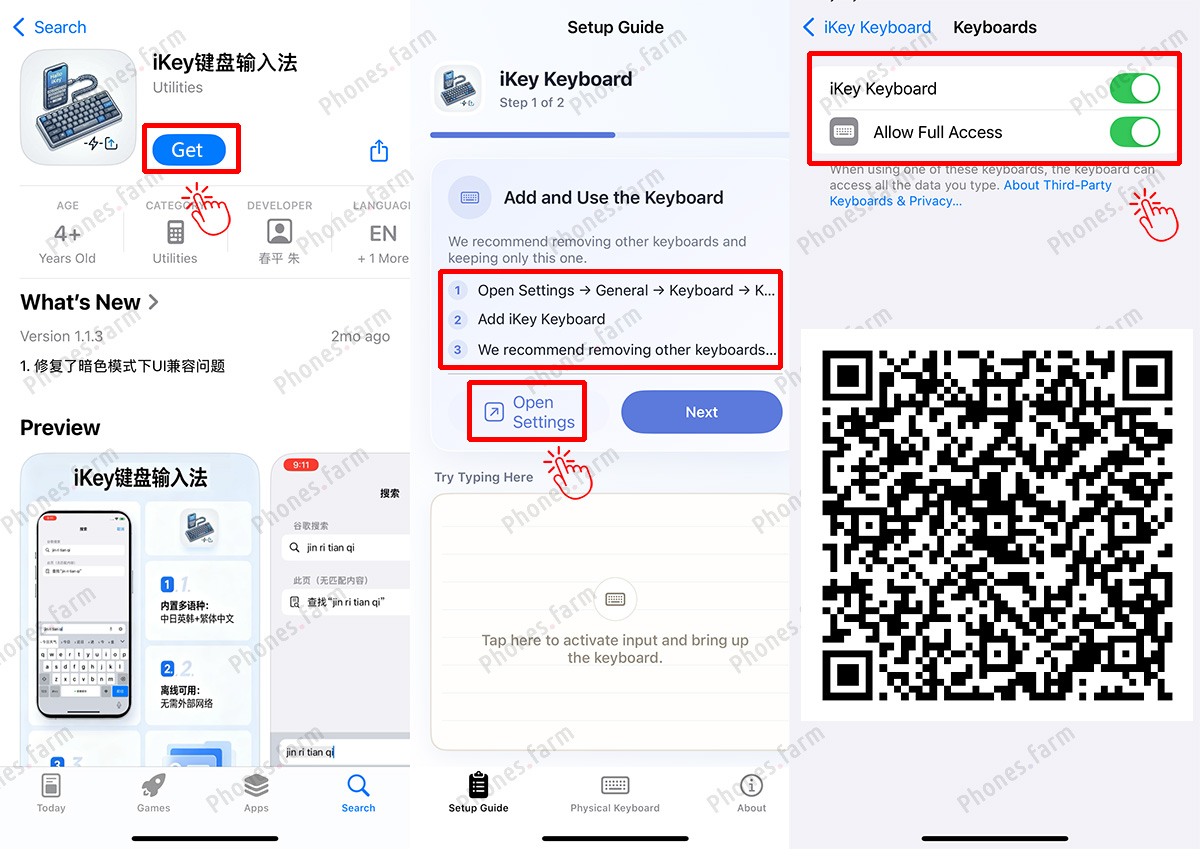
Download the โ€œiKey้”ฎ็›˜่พ“ๅ…ฅๆณ•โ€(copy&paste or Scan the QR code), and follow the instructions to set it up and enable it.