  • No jailbreak required: No intrusion into iOS, and no developer mode needed.
  • Basic functionality is complete: Users without programming experience can still use this tool’s batch management and control functions.
  • Enhanced stability: Real-time video transmission ensures a more stable and reliable connection.
  • Strong anti-interference capability: Short-term network fluctuations or outages will not cause the connection to drop.
  • Native touch experience: Achieving realistic physical touch operation through virtual keyboard and mouse hardware.

1.System requirements

System: Windows 10/11 or later / Mac ARM
RAM: 8GB or higher
Network: Gigabit LAN

2.Download and install iClick

Contact support after purchasing the hardware to obtain the download link.

1.Windows installation

Download iClick and the VC runtime library. iClick jailbreak-free PC Control iPhone iOS Automation Script OTG Batch synchronization control phone farm iPhone automate tasks Run the “VC runtime library.exe” installer to complete the installation. iClick jailbreak-free PC Control iPhone iOS Automation Script OTG Batch synchronization control phone farm iPhone automate tasks Run the”iClick(Windows)” installer to complete the installation. iClick jailbreak-free PC Control iPhone iOS Automation Script OTG Batch synchronization control phone farm iPhone automate tasks

3.Mac OS ARM installation

Download iClick.dmg, double-click to open, and drag the icon to applications to complete the installation. iClick jailbreak-free PC Control iPhone iOS Automation Script OTG Batch synchronization control phone farm iPhone automate tasks
Remove system security blocks (Frequently Asked Questions):
Because it’s not available on the App Store, when you first double-click to open it on macOS,
The system may display a message saying “Cannot open because Apple cannot check if it contains malware”.
Solution: Open “System Settings” -> “Privacy & Security” on your Mac, scroll down to find the “Security” section, click “Open Anyway,” and enter your Mac password to run normally.

4.iClick Language switching

iClick jailbreak-free PC Control iPhone iOS Automation Script OTG Batch synchronization control phone farm iPhone automate tasks

5.Register an account (each account has three free quotas)

iClick jailbreak-free PC Control iPhone iOS Automation Script OTG Batch synchronization control phone farm iPhone automate tasks

3.Connect iPhone to iClick

Lightning cable connects to the phone, and a USB-C cable connects the hardware to the computer.

iClick jailbreak-free PC Control iPhone iOS Automation Script OTG Batch synchronization control phone farm iPhone automate tasks 👉Click to buy

Start broadcasting the phone screen

The phone must be on the same network as the computer. After mirroring, the phone screen will appear on the computer.(If it does not appear, then please check the network.)
iClick jailbreak-free PC Control iPhone iOS Automation Script OTG Batch synchronization control phone farm iPhone automate tasks

Right-click, select “Bind Chip,” choose the corresponding chip, and then bind.

iClick jailbreak-free PC Control iPhone iOS Automation Script OTG Batch synchronization control phone farm iPhone automate tasks iClick jailbreak-free PC Control iPhone iOS Automation Script OTG Batch synchronization control phone farm iPhone automate tasks When multiple hardware devices are waiting to be bound, please unplug the Lightning cable or USB-C cable and plug it back in. The log window will display the phone code, and then bind the corresponding hardware.

Right-click, select Run Init Device Wizard, check and complete the remaining steps.

iClick jailbreak-free PC Control iPhone iOS Automation Script OTG Batch synchronization control phone farm iPhone automate tasks

Watch the video guide and check if the settings are enabled.
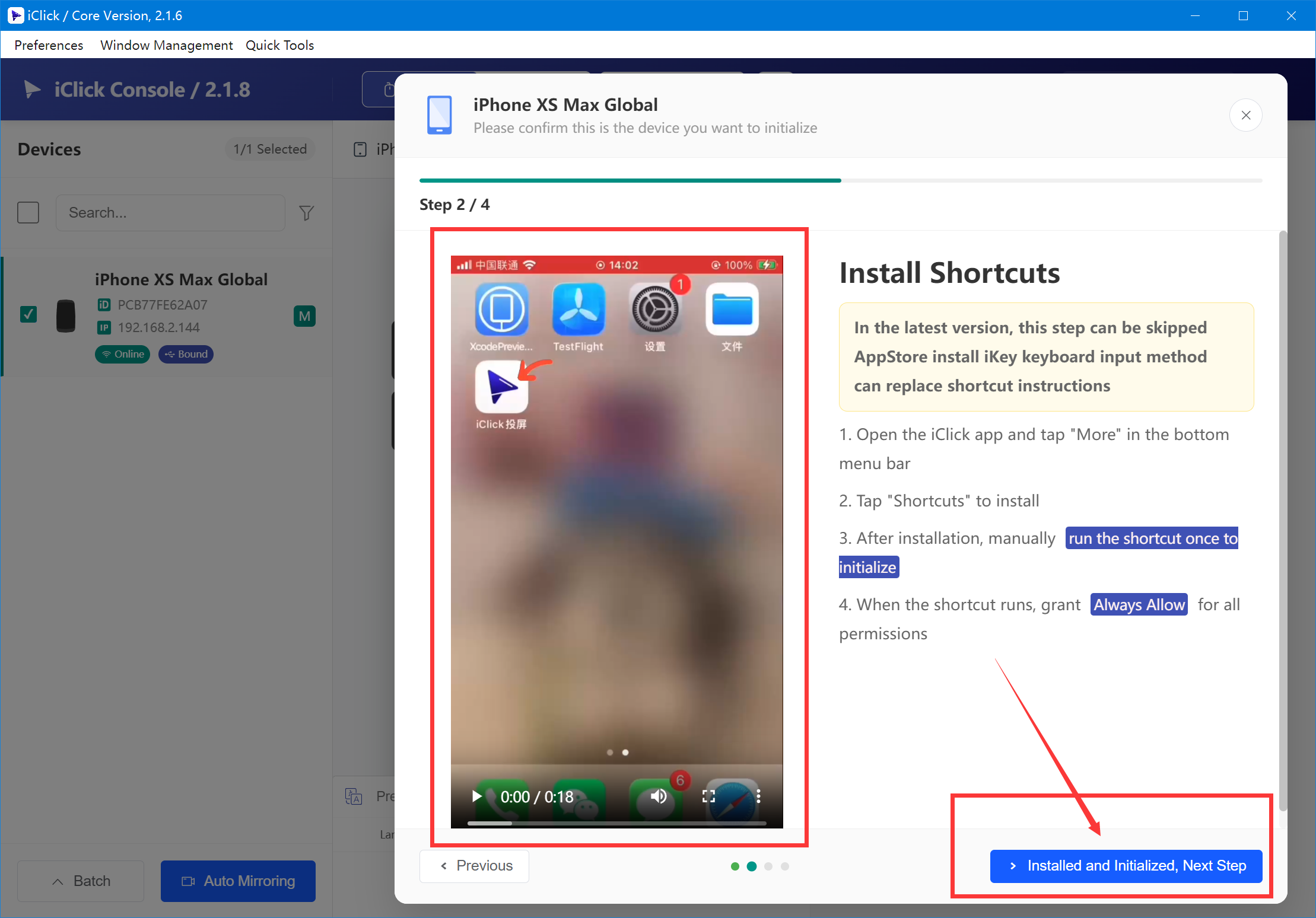
iClick jailbreak-free PC Control iPhone iOS Automation Script OTG Batch synchronization control phone farm iPhone automate tasks

Bind button

Settings-Accessibility-Touch-Assistivetouch-Devices-iClick+(Customise Additional Buttons..) iClick jailbreak-free PC Control iPhone iOS Automation Script OTG Batch synchronization control phone farm iPhone automate tasks